Bạn đang muốn làm một chiếc biển hiệu mới cho cửa hàng nhưng chưa biết nên chọn kiểu dáng, màu sắc hay phong cách nào cho hợp? AI Signboard Prompt Generator là tiện ích mở rộng (extension) trình duyệt miễn phí do Quốc Đăng phát triển. Chỉ với vài cú click, extension sẽ giúp bạn tạo ra một đoạn mô tả (prompt) chi tiết để dán vào bất kỳ công cụ AI tạo ảnh nào như ChatGPT, Gemini, Grok, Copilot, giúp bạn xem trước concept biển hiệu sẽ trông như thế nào, kể cả ghép thử trực tiếp lên ảnh mặt tiền cửa hàng thật của bạn.
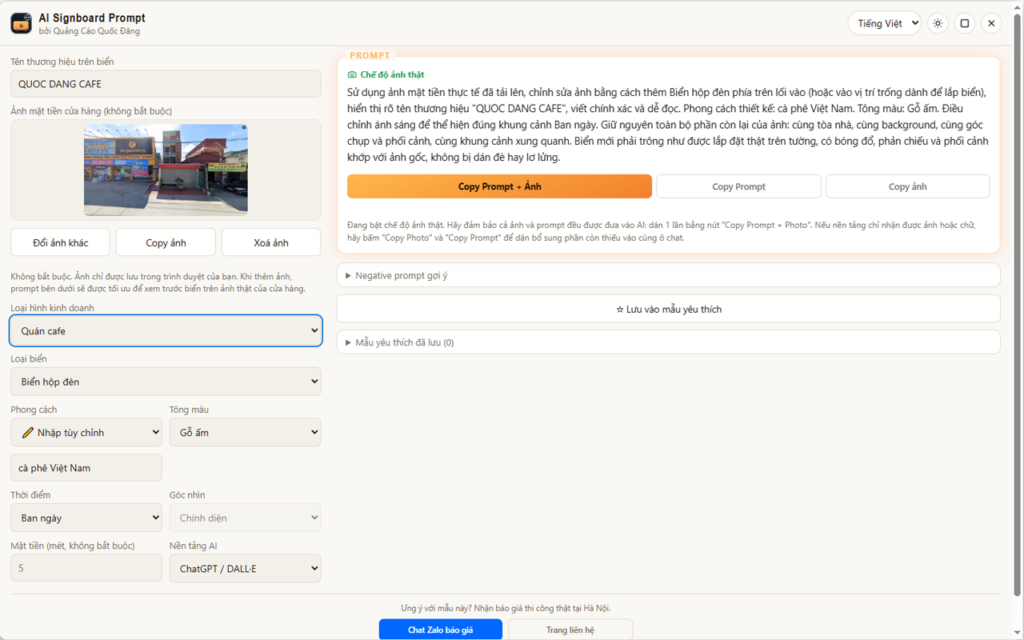
AI Signboard Prompt Generator Extension – by Công ty Quốc Đăng
Extension này dùng để làm gì?
Bình thường, muốn nhờ AI vẽ biển hiệu, bạn phải tự gõ mô tả kiểu như “tôi muốn một cái biển hiệu quán cà phê phong cách tối giản, tông màu be”, vừa mất thời gian vừa dễ thiếu ý. Extension này giúp bạn bỏ qua bước đó. Bạn chỉ cần chọn loại hình kinh doanh, kiểu biển hiệu, phong cách thiết kế, tông màu, thời điểm trong ngày và góc chụp mong muốn, extension sẽ tự động ghép lại thành một prompt chi tiết, đúng chuẩn để AI hiểu và tạo ra ảnh chính xác hơn nhiều so với việc bạn tự gõ tay.
Hướng dẫn sử dụng từng bước
- Cài đặt extension. Chọn đúng trình duyệt bạn đang dùng (Chrome, Firefox hoặc Edge) ở các nút tải phía trên rồi bấm “Thêm vào trình duyệt”.
- Mở bảng điều khiển. Sau khi cài xong, bấm vào biểu tượng extension trên thanh công cụ trình duyệt, dù đang ở trang web nào, kể cả ngay trên trang của công cụ AI, để mở bảng nổi (floating panel) lên.
- Chọn loại hình kinh doanh. Ví dụ quán cà phê, nhà hàng, tiệm bánh, salon tóc, phòng khám… Extension sẽ tự động gợi ý sẵn kiểu biển hiệu, phong cách, tông màu và ánh sáng phù hợp với ngành hàng bạn chọn.
- Tinh chỉnh lại nếu muốn. Bạn hoàn toàn có thể đổi bất kỳ lựa chọn nào như kiểu biển, phong cách, màu sắc, thời điểm hay góc máy, nếu không thích gợi ý mặc định.
- Tải ảnh mặt tiền cửa hàng thật (không bắt buộc). Nếu có sẵn ảnh cửa hàng của mình, cứ tải lên. Extension sẽ chuyển sang chế độ “ảnh thật”, yêu cầu AI chỉ thêm biển hiệu mới vào đúng ảnh đó và giữ nguyên toà nhà, bối cảnh xung quanh. Nhờ vậy bạn sẽ thấy được hình ảnh trước và sau chân thực, thay vì một khung cảnh tưởng tượng hoàn toàn mới.
- Chọn nền tảng AI bạn muốn dùng. Extension sẽ tự tinh chỉnh định dạng prompt cho phù hợp với công cụ AI bạn chọn trong danh sách xổ xuống.
- Sao chép và dán. Bấm nút sao chép, mở tab công cụ AI, dán vào khung chat rồi gửi đi. Vậy là xong!
Giải thích các nút chức năng
Các tính năng chính
- Tạo prompt chi tiết, có cấu trúc rõ ràng chỉ bằng vài lần chọn, không cần biết viết prompt.
- Hoạt động trên mọi trang web, kể cả ngay trên trang chat của công cụ AI.
- Tự động gợi ý kiểu biển hiệu, phong cách, màu sắc, ánh sáng phù hợp theo từng loại hình kinh doanh.
- Chế độ ảnh thật, ghép biển hiệu mới lên đúng ảnh mặt tiền cửa hàng của bạn.
- Hỗ trợ tinh chỉnh định dạng prompt riêng cho nhiều nền tảng AI tạo ảnh khác nhau.
- Gợi ý sẵn “negative prompt” giúp tránh lỗi thường gặp như chữ bị mờ, méo hoặc dính watermark trên ảnh AI tạo ra.
- Lưu lại các tổ hợp lựa chọn yêu thích để dùng lại về sau.
- Giao diện đa ngôn ngữ, có chế độ sáng/tối, kéo di chuyển và phóng to bảng điều khiển theo ý muốn.
- Toàn bộ ảnh và lựa chọn của bạn chỉ lưu cục bộ trên trình duyệt, không tải lên máy chủ nào, không chia sẻ cho bên thứ ba.
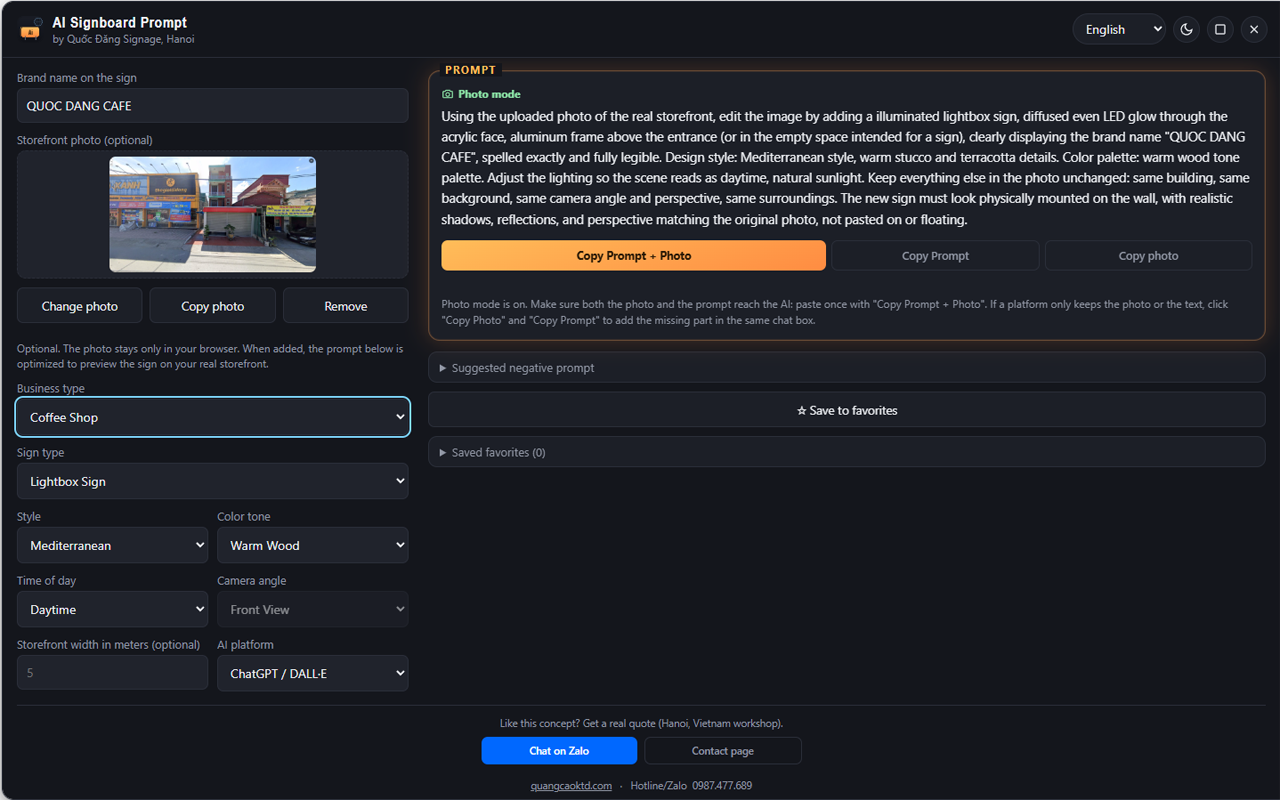
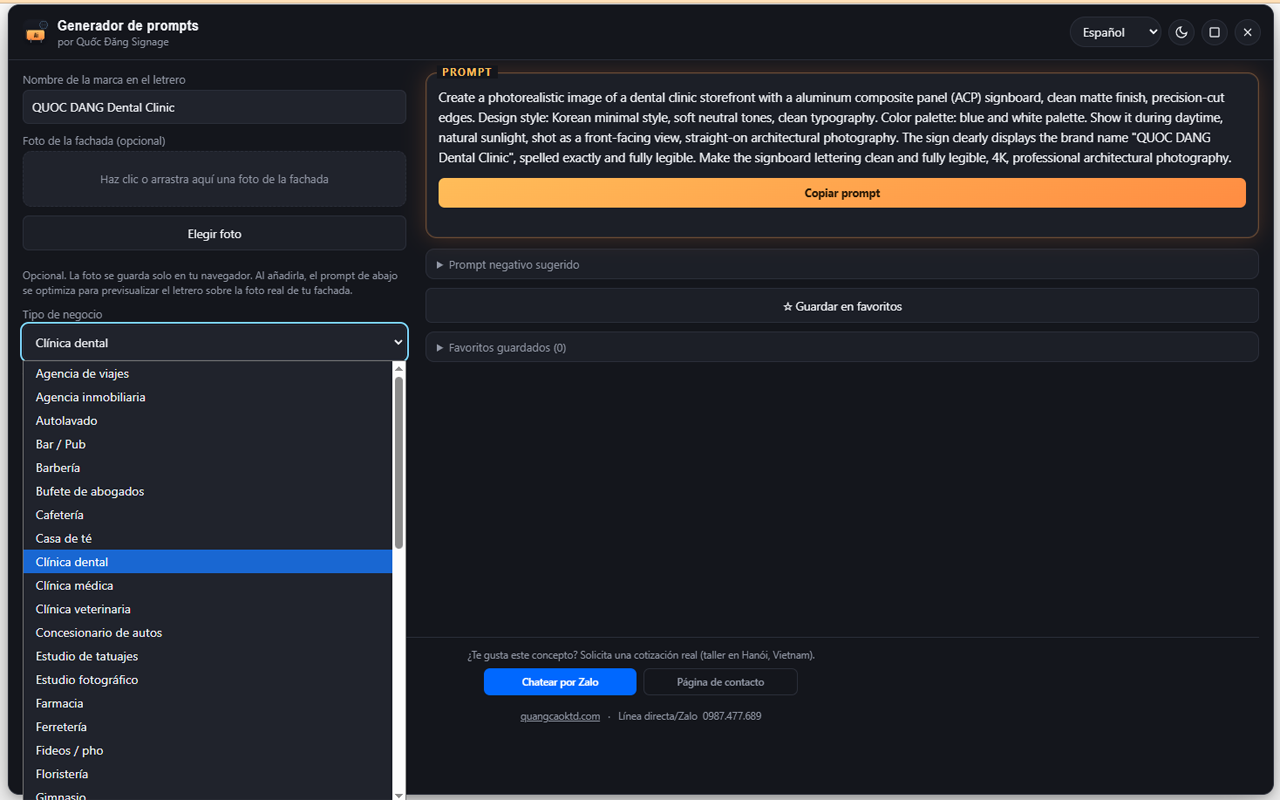
Extension hỗ trợ nhiều ngôn ngữ khác nhau, giúp cả khách nước ngoài lẫn đối tác quốc tế của bạn đều dễ dàng sử dụng.
Extension này dành cho ai?
Phù hợp với các công ty biển hiệu, quảng cáo, chủ cửa hàng đang lên kế hoạch làm biển mới, các agency marketing cần chuẩn bị concept thiết kế cho khách hàng, và bất kỳ ai muốn xem trước ý tưởng biển hiệu một cách nhanh chóng, chân thực trước khi quyết định thi công thực tế.
Câu hỏi thường gặp (FAQ)
Extension này có mất phí không?
Không. Extension hoàn toàn miễn phí để cài đặt và sử dụng. Bạn chỉ cần có sẵn tài khoản của công cụ AI tạo ảnh mà bạn muốn dùng, một số công cụ AI có thể giới hạn số lượt tạo ảnh miễn phí theo chính sách riêng của họ.
Tôi có cần biết thiết kế hay biết viết prompt AI không?
Không cần. Bạn chỉ cần chọn các lựa chọn có sẵn trong biểu mẫu, extension sẽ tự soạn prompt chi tiết giúp bạn.
Ảnh cửa hàng tôi tải lên có bị lưu trữ ở đâu khác không?
Không. Ảnh và mọi lựa chọn của bạn chỉ được lưu cục bộ ngay trên trình duyệt của chính bạn, không được gửi lên bất kỳ máy chủ nào. Bạn có thể xoá ảnh đã lưu bất cứ lúc nào chỉ bằng một cú click.
Vì sao khi dán vào ChatGPT hoặc Gemini chỉ thấy chữ hoặc chỉ thấy ảnh, không thấy cả hai?
Đây là giới hạn từ chính nền tảng AI đó khi xử lý nội dung dán cùng lúc gồm cả chữ và ảnh, không phải lỗi của extension. Cách khắc phục là dùng lần lượt nút Copy Photo để dán ảnh trước, sau đó dùng nút Copy Prompt để dán thêm phần văn bản mô tả.
Extension hỗ trợ những công cụ AI tạo ảnh nào?
Extension hỗ trợ tinh chỉnh định dạng prompt cho nhiều nền tảng AI phổ biến như ChatGPT, Gemini, Grok, Microsoft Copilot và các công cụ tạo ảnh AI khác. Bạn chỉ cần chọn nền tảng mình muốn dùng từ danh sách trong extension.
Nếu tôi thích concept vừa tạo ra thì làm sao để đặt làm biển hiệu thật?
Bạn có thể liên hệ trực tiếp với Quốc Đăng qua nút Zalo hoặc trang liên hệ ngay trong extension để được tư vấn báo giá và thi công lắp đặt biển hiệu theo đúng concept bạn vừa xem trước.
Bạn đã có ý tưởng cho biển hiệu cửa hàng của mình chưa? Hãy dùng thử AI Signboard Prompt Generator ngay hôm nay, và khi đã ưng ý với concept, liên hệ Công ty TNHH Quảng Cáo Nội Thất Quốc Đăng để được tư vấn thiết kế và thi công thực tế.
Want to make a new signboard for your shop but not sure which style, color or design to pick? AI Signboard Prompt Generator is a free browser extension built by Quoc Dang. In just a few clicks, it creates a detailed prompt you can paste into any AI image tool such as ChatGPT, Gemini, Grok or Copilot, so you can preview what your signboard concept will look like, including compositing it directly onto a real photo of your storefront.
AI Signboard Prompt Generator Extension – by Quoc Dang Company
What is this extension for?
Normally, to have AI draw a signboard you have to type out a description yourself, something like “I want a minimalist coffee shop signboard in beige tones”, which is time-consuming and easy to leave details out of. This extension skips that step for you. Just pick your business type, signboard type, design style, color tone, time of day and camera angle, and the extension automatically assembles a detailed, correctly formatted prompt so the AI understands what you want and generates a far more accurate image than typing it yourself would.
Step-by-step guide
- Install the extension. Pick your browser (Chrome, Firefox or Edge) using the download buttons above and click “Add to browser”.
- Open the control panel. Once installed, click the extension icon on your browser toolbar, no matter what site you’re on, even right on the AI tool’s own page, to open the floating panel.
- Choose your business type. For example coffee shop, restaurant, bakery, hair salon, clinic and so on. The extension automatically suggests a matching signboard type, style, color tone and lighting for the industry you pick.
- Fine-tune anything you like. You can freely change any option, such as signboard type, style, color, time of day or camera angle, if you don’t like the default suggestion.
- Upload a real storefront photo (optional). If you already have a photo of your shop, upload it. The extension switches to “real photo” mode, telling the AI to add only the new signboard onto that exact photo while keeping the building and surroundings unchanged. That way you get a realistic before-and-after view instead of a completely imagined scene.
- Choose the AI platform you want to use. The extension automatically adjusts the prompt format to match whichever AI tool you select from the dropdown list.
- Copy and paste. Click the copy button, open the AI tool’s tab, paste it into the chat box and send. That’s it!
What each button does
Key features
- Generates a detailed, clearly structured prompt with just a few selections, no prompt-writing skills needed.
- Works on any website, even right on the AI tool’s own chat page.
- Automatically suggests a matching signboard type, style, color and lighting for your business type.
- Real-photo mode composites the new signboard directly onto your actual storefront photo.
- Supports prompt-format tuning for multiple different AI image-generation platforms.
- Includes a ready-made “negative prompt” that helps avoid common issues like blurry or distorted text and watermarks in AI-generated images.
- Saves your favorite combinations of choices for later reuse.
- Multi-language interface, light/dark mode, and a draggable, resizable control panel.
- All your images and choices are stored locally in your browser only, never uploaded to any server or shared with third parties.
The extension supports many different languages, making it easy for both international customers and your overseas partners to use.
Who is this extension for?
It’s a great fit for signage and advertising companies, shop owners planning a new signboard, marketing agencies preparing design concepts for clients, and anyone who wants a quick, realistic preview of a signboard idea before committing to real installation.
Frequently Asked Questions (FAQ)
Is this extension paid?
No. The extension is completely free to install and use. You just need an account with whatever AI image-generation tool you want to use; some AI tools may cap the number of free image generations under their own policy.
Do I need design skills or know how to write AI prompts?
No. Just pick the available options in the form and the extension will compose a detailed prompt for you automatically.
Is my uploaded storefront photo stored anywhere else?
No. Your photo and every choice you make are stored locally in your own browser only, never sent to any server. You can delete a saved photo at any time with a single click.
Why does pasting into ChatGPT or Gemini show only text or only an image, never both?
This is a limitation of that particular AI platform when it handles pasted content containing both text and an image at once, not a bug in the extension. The fix is to use the Copy Photo button first to paste the image, then use the Copy Prompt button afterward to paste the text description.
Which AI image tools does the extension support?
The extension supports prompt-format tuning for many popular AI platforms such as ChatGPT, Gemini, Grok, Microsoft Copilot and other AI image-generation tools. Just pick your preferred platform from the list inside the extension.
If I like the concept I just created, how do I get it made into a real signboard?
You can reach out to Quoc Dang directly via the Zalo button or the contact page inside the extension to get a quote and have your exact previewed concept installed.
Already have an idea for your shop’s signboard? Try AI Signboard Prompt Generator today, and once you’re happy with the concept, contact Quoc Dang Interior Advertising Co., Ltd. for design consultation and real-world installation.
